We earn a commission if you buy through links on this page, at no extra cost to you. It never changes what we recommend. How we make money.
The short answer
- WiZ is the better pick for one or two rooms: bulbs connect straight to Wi-Fi, so there's no hub to buy.
- Philips Hue is the better pick for a growing system: the Hue Bridge uses Zigbee, adds accessories and keeps lots of bulbs off your router.
- Signify owns both brands, and both work with Alexa and Google Home.
- Both are perfect for renters because bulbs screw into lamps and fixtures you already have, and come with you when you move.
Our picks

Philips Hue White and Color Ambiance Starter Kit
Color bulbs bundled with the Hue Bridge, the easiest way to start a Hue system that can grow room by room.
Good
- Hue Bridge included for remote control and accessories
- Zigbee keeps bulbs off your Wi-Fi
- Huge range of bulbs, lamps and switches
Watch for
- Costs more than WiZ to get started
- Bridge needs a free Ethernet port on your router

WiZ Color A19 Smart Bulb
A Wi-Fi color bulb from Signify's WiZ line that needs no hub and sets up in the WiZ app in minutes.
Good
- No hub needed
- Lower cost per bulb
- Works with Alexa and Google Home
Watch for
- Every bulb adds a device to your router
- Smaller accessory range than Hue
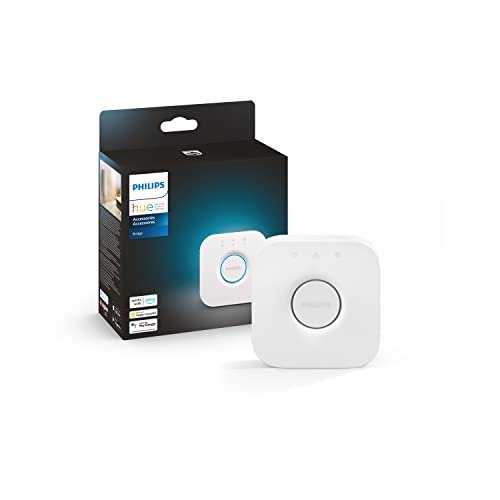
Philips Hue Bridge
The Zigbee hub that unlocks Hue's away-from-home control, accessories and Matter support.
Good
- Control from anywhere and automations
- Supports Hue motion sensors and switches
- Matter support via software update
Watch for
- Extra purchase if you start with Bluetooth bulbs
- Needs a wired router connection
| Product | Best for | How it installs |
|---|---|---|
| Philips Hue White and Color Ambiance Starter Kit | Best for a whole apartment | The Bridge plugs into your router; bulbs go in existing lamps and fixtures. |
| WiZ Color A19 Smart Bulb | Best budget smart bulb | Screw it into any standard lamp; no hub or wiring. |
| Philips Hue Bridge | Best upgrade for Hue | Small box that plugs into your router; it moves with you. |
Philips Hue vs WiZ is the first choice most renters face when they want smart lighting. WiZ is the better pick for a few bulbs because it connects straight to Wi-Fi with no hub, while Philips Hue is the better pick for a whole apartment because the Hue Bridge makes a bigger system faster and more reliable. Both are owned by Signify, both work with Alexa and Google Home, and both screw into the lamps you already own.
Smart bulbs are where we tell most renters to begin, since they need no wiring, no landlord approval and no tools. In this comparison I’ll cover how the two systems connect, what that means for your router, and which kit we’d buy for a studio versus a two-bedroom. If you’re building a full setup, our smart home for renters guide shows where lighting fits.
Philips Hue vs WiZ: the short answer
Pick WiZ if you want one or two smart lamps on a budget; pick Philips Hue if you want more than a handful of lights, switches and sensors. If I were lighting my own one-bedroom, I’d start with Hue in the living room and bedroom, because I know I’d keep adding to it.
Side by side
The biggest difference between Hue and WiZ is how the bulbs connect: Zigbee through a bridge versus direct Wi-Fi. Here’s how they compare for an apartment:
| Philips Hue | WiZ | |
|---|---|---|
| Owner | Signify | Signify |
| Connection | Zigbee via Hue Bridge (Bluetooth without it) | Wi-Fi, no hub |
| Hub needed | For away-from-home control and accessories | No |
| Router load | One device (the Bridge) | One device per bulb |
| Accessory range | Large: switches, motion sensors, lamps | Smaller |
| Matter | Via the Hue Bridge | Many WiZ products |
| Works with Alexa and Google Home | Yes | Yes |
| Cost to start | Higher | Lower |
Hub vs no hub
WiZ bulbs skip the hub by joining your Wi-Fi directly, while Hue bulbs talk to the Hue Bridge over Zigbee. That choice matters more in an apartment than you’d think.
Many renters use the internet provider’s router, and a basic router isn’t built to manage dozens of devices. With WiZ, every bulb is one more Wi-Fi device. With Hue, the router only sees the Bridge, and the bulbs form their own Zigbee mesh. Here’s how we’d decide:
- Fewer than about six bulbs: WiZ on Wi-Fi is simple and cheap.
- Lots of bulbs plus sensors: the Hue Bridge keeps things stable.
- No Ethernet port free on your router: WiZ, or Hue over Bluetooth for a single room.
- Spotty Wi-Fi in the bedroom: Hue, because Zigbee bulbs relay signals to each other.
Our picks for renters
Philips Hue White and Color Ambiance Starter Kit: best for a whole apartment
The Philips Hue White and Color Ambiance Starter Kit bundles color bulbs with the Hue Bridge, which is the cheapest way into a full Hue system. Put the bulbs in your existing lamps and ceiling fixtures, plug the Bridge into your router, and you can add switches and motion sensors later.
WiZ Color A19 Smart Bulb: best budget smart bulb
The WiZ Color A19 Smart Bulb is the one we’d suggest for a desk lamp or a bedside light. It joins your 2.4GHz Wi-Fi with no hub, works with Alexa and Google Home, and costs less per bulb than Hue.
Philips Hue Bridge: best upgrade for Hue
The Philips Hue Bridge is worth adding if you started with Hue Bluetooth bulbs. The Bridge unlocks control when you’re away, automations, Hue accessories and Matter support through a software update.
Ecosystems, Matter and mixing brands
Signify keeps Hue and WiZ in separate apps, but Matter lets both appear in one smart home app. The Hue Bridge supports Matter, and many WiZ products do too, so Google Home or Apple Home can control both side by side. We’d still choose one brand for scenes and schedules, since each app works best with its own bulbs.
Rented fixtures and wall switches
Smart bulbs only work while the wall switch is on, so tell roommates to leave it up or add a no-wire smart switch. Hue sells battery-powered dimmer switches that stick on the wall next to the old switch, which is a renter-friendly fix. Avoid replacing the actual wall switch unless your landlord agrees. If you’d rather automate a lamp you already own, a Matter smart plug is another option.
Which is better for an apartment?
For a studio or a couple of lamps, WiZ wins on cost and simplicity; for a one- or two-bedroom you plan to fill with lights, Hue wins on reliability and accessories. Either way, the bulbs come with you on move-out day. Just swap the original bulbs back in and keep the smart ones for your next place.
Our verdict on Philips Hue vs WiZ
Choose Philips Hue if you want a system that grows with you, and WiZ if you want affordable smart bulbs today. If you’re also picking a voice assistant, our Alexa vs Google Home comparison helps you choose the assistant to control them with.
Questions renters ask
Is Philips Hue better than WiZ?
Hue is better for larger systems, accessories and reliability, thanks to the Hue Bridge and Zigbee. WiZ is better value for a few bulbs because it needs no hub.
Does WiZ need a hub?
No. WiZ bulbs connect directly to your 2.4GHz Wi-Fi and are controlled in the WiZ app, Alexa or Google Home.
Are Philips Hue and WiZ the same company?
Yes. Both are owned by Signify, the lighting company formerly known as Philips Lighting, but they use separate apps and different connections.
Can WiZ bulbs work with the Philips Hue app?
Not directly. The brands are kept separate, though Matter can bring both into a shared smart home app like Google Home or Apple Home.
Which is better for renters?
Both are renter-friendly. Choose WiZ for a couple of lamps and Hue if you plan to light the whole apartment and take the system to future homes.
Why you can trust this guide
- Products are checked against manufacturer specifications, installation manuals and long-term owner reports.
- Each pick is scored on our renter criteria: install footprint, reversibility, portability, subscription costs and ecosystem support.
- We never accept payment for placement. Affiliate commissions do not affect rankings.
Last reviewed . Read our research process and editorial policy, or report an error.
Sources

RenterSmartHome Editorial Team
Research & editorial
We research smart home gear specifically for apartments and rentals: how it installs, whether it is reversible, what it needs from your landlord, and whether it moves with you. Every guide follows our published research process and editorial policy.