We earn a commission if you buy through links on this page, at no extra cost to you. It never changes what we recommend. How we make money.
The short answer
- A renter-friendly smart lock is a retrofit lock that replaces only the interior thumbturn, so the exterior keyhole and your landlord's key keep working.
- The August Wi-Fi Smart Lock (4th Gen) is the best overall pick for most renters thanks to built-in Wi-Fi and a compact retrofit design.
- The SwitchBot Lock Pro is the only true no-tools option because it sticks onto the thumbturn with adhesive.
- Keep the original thumbturn parts in a labeled bag and reinstall them before you move out.
Our picks
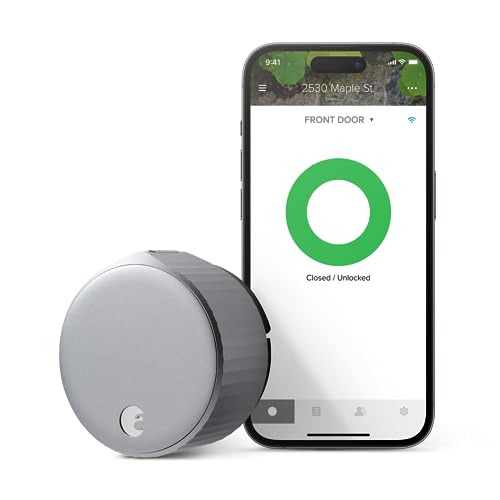
August Wi-Fi Smart Lock (4th Gen)
A compact retrofit smart lock with built-in Wi-Fi, so you get remote access and auto-lock without an extra hub. The best fit for most single-cylinder deadbolts.
Good
- Built-in Wi-Fi, no separate bridge
- Works with Alexa, Google Assistant and Apple Home
- DoorSense tells you if the door is actually closed
Watch for
- Some deadbolt brands need an adapter
- Uses CR123 batteries

SwitchBot Lock Pro
A stick-on smart lock that turns your existing thumbturn mechanically. Ideal if your lease forbids touching the lock at all.
Good
- Zero disassembly of the landlord's lock
- Optional keypad and fingerprint add-ons
- Matter support through a SwitchBot hub
Watch for
- Remote access and Matter need a SwitchBot hub
- Bulkier on the door than a retrofit lock
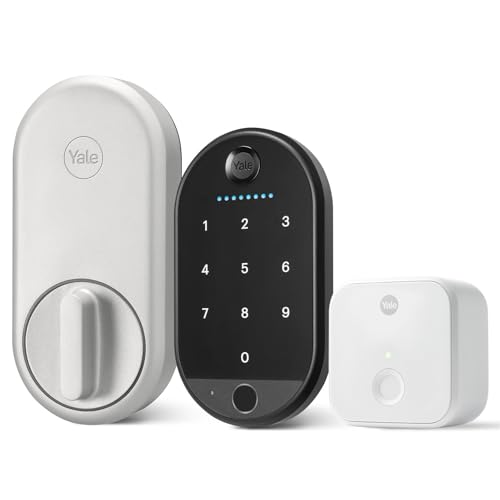
Yale Approach Lock with Wi-Fi
Yale's retrofit lock keeps your exterior hardware and pairs with Yale's keypad accessories for code entry from outside.
Good
- Keeps existing keys and exterior hardware
- Pairs with Yale keypad accessories
- Auto-unlock as you approach
Watch for
- Keypad is a separate purchase
- Fit depends on your deadbolt model

Aqara Smart Lock U200
A retrofit lock built around Matter over Thread, with Apple Home Key support for tap-to-unlock with an iPhone or Apple Watch.
Good
- Matter over Thread for cross-platform control
- Apple Home Key support
- Includes a fingerprint keypad in some bundles
Watch for
- Thread needs a border router (e.g., a recent Apple TV, HomePod or Nest hub)
- Larger interior unit
| Product | Best for | How it installs |
|---|---|---|
| August Wi-Fi Smart Lock (4th Gen) | Best overall | Replaces only the interior thumbturn with a screwdriver; the outside keyhole and landlord key keep working. |
| SwitchBot Lock Pro | Best no-tools install | Mounts over the thumbturn with adhesive; no screws, no disassembly, peel off when you move. |
| Yale Approach Lock with Wi-Fi | Best with a keypad | Retrofits onto the existing deadbolt from the inside; original thumbturn goes back on at move-out. |
| Aqara Smart Lock U200 | Best for Matter & Apple Home Key | Installs over the existing deadbolt on the inside of the door; the landlord's key still works outside. |
The best smart lock for renters is a retrofit smart lock: a smart lock that replaces only the interior thumbturn of your existing deadbolt, so the exterior keyhole, the bolt and your landlord’s key all keep working. A retrofit smart lock gives you keyless entry, auto-lock and guest codes without re-keying, drilling, or risking your security deposit, and it moves with you to the next apartment.
Below we break down the four smart locks that fit that renter brief, how to check deadbolt compatibility, what to ask your landlord, and how to put everything back on move-out day. Every pick keeps the original deadbolt in place, which is the single most important rule for a smart lock in a rental.
What makes a smart lock renter-friendly?
A renter-friendly smart lock leaves the landlord-owned deadbolt hardware in place and is fully reversible in under 15 minutes. That rules out most full-replacement smart deadbolts, which swap the exterior keyed cylinder and lock out the landlord’s master key.
There are two renter-safe smart lock designs:
- Retrofit smart locks (August, Yale Approach, Aqara U200) remove two screws and the interior thumbturn, then mount the motorized unit onto the existing deadbolt’s tailpiece. The deadbolt, strike plate and exterior keyhole stay untouched.
- Stick-on smart locks (SwitchBot Lock Pro) mount over the thumbturn with adhesive and rotate it mechanically. No part of the lock is disassembled at all.
| Smart lock type | Tools needed | Landlord key still works | Typical removal time |
|---|---|---|---|
| Retrofit smart lock | Screwdriver | Yes | 10–15 minutes |
| Stick-on smart lock | None | Yes | 5 minutes |
| Full-replacement smart deadbolt | Screwdriver, sometimes drill | No (new cylinder) | 20–30 minutes |
If you are browsing smart locks for an apartment, filter for “retrofit” or “fits over existing deadbolt” in the product description. Those phrases are the fastest way to spot a lease-friendly smart lock.
Our top smart lock picks for renters, explained
August Wi-Fi Smart Lock (4th Gen): best overall
The August Wi-Fi Smart Lock is the retrofit smart lock most renters should buy first. The 4th-generation August lock builds Wi-Fi into the lock itself, so remote locking, activity history and guest access work without a separate bridge plugged into the wall. DoorSense, a small sensor on the door frame, confirms whether the door is actually shut, which makes auto-lock far more reliable.
The August smart lock works with Amazon Alexa, Google Assistant and Apple Home, so it fits whichever voice assistant you already use. The main trade-offs are CR123 batteries (less common than AA) and the occasional deadbolt that needs an adapter plate, so run August’s compatibility check before ordering.
SwitchBot Lock Pro: best no-tools install
The SwitchBot Lock Pro is the only smart lock here that never touches a screw. The SwitchBot lock sticks over your thumbturn with adhesive pads and uses an adjustable grip to turn it, which makes it the best smart lock for strict leases that say “no alterations to locks.”
SwitchBot’s ecosystem adds a keypad with fingerprint unlock, and pairing the lock with a SwitchBot hub unlocks remote control and Matter support. Budget for that hub if you want to lock the door from work or control it through Apple Home or Google Home.
Yale Approach Lock with Wi-Fi: best with a keypad
The Yale Approach Lock is Yale’s retrofit smart lock, and it shines for renters who want code entry from outside. Pair the Yale Approach with a Yale keypad mounted beside the door (adhesive mounting works on most door frames) and roommates or dog walkers get their own codes, no key copies required.
Like other retrofit smart locks, the Yale Approach mounts over the existing deadbolt from the inside of the door, so the landlord’s key keeps working and the original thumbturn goes back on when you leave.
Aqara Smart Lock U200: best for Matter and Apple Home Key
The Aqara Smart Lock U200 is the retrofit smart lock to pick if you want a future-proof, platform-neutral setup. The Aqara U200 speaks Matter over Thread, so the same smart lock works in Apple Home, Google Home, Amazon Alexa and SmartThings, and it supports Apple Home Key for tap-to-unlock with an iPhone or Apple Watch.
Thread requires a Thread border router, which many renters already own in the form of a recent Apple TV, HomePod mini, or Nest hub. If you don’t have one, factor it into the cost.
How to check if a smart lock fits your deadbolt
Smart lock compatibility comes down to your deadbolt’s brand, its tailpiece and the space around the thumbturn. Check it in five minutes before you buy:
- Confirm a single-cylinder deadbolt. You should see a keyhole outside and a thumbturn inside. Double-cylinder deadbolts (keyholes on both sides) are not supported by retrofit smart locks.
- Find the deadbolt brand. It is usually stamped on the latch faceplate on the edge of the door (Kwikset, Schlage, Baldwin, Weiser and so on).
- Measure clearance. Retrofit smart locks need room around the thumbturn; a door handle mounted very close to the deadbolt can block the smart lock body.
- Test the bolt. The deadbolt should extend and retract smoothly without pushing on the door. A smart lock motor struggles with a sticky bolt, so ask maintenance to adjust the strike plate first.
- Use the manufacturer’s checker. August, Yale and Aqara publish compatibility tools; SwitchBot lists supported thumbturn shapes.
Talking to your landlord about a smart lock
Most leases include a clause like “tenant shall not change or add locks without written consent.” A retrofit smart lock arguably doesn’t change the lock, but written approval protects your deposit. A short, specific request works best:
“I’d like to install a retrofit smart lock on the inside of my front door. It replaces only the interior thumbturn, the existing deadbolt and exterior keyhole stay the same, and your key will continue to work. I’ll reinstall the original part when I move out.”
Mention that the landlord’s master key keeps working; for property managers, that point usually settles it. Keep the email reply with your lease documents. For more renter-safe security ideas, see our guide to the best peephole cameras for apartments.
Installing (and uninstalling) a retrofit smart lock
A retrofit smart lock install takes 15 to 30 minutes with a screwdriver:
- Lock the door open (bolt retracted) and remove the two screws holding the interior thumbturn.
- Bag and label the thumbturn and screws. Tape the bag inside a kitchen cabinet so it’s there on move-out day.
- Attach the smart lock’s mounting plate using the included screws and the deadbolt’s existing tailpiece.
- Seat the smart lock body, insert batteries and calibrate the lock in the app.
- Test with the door open, then closed, then with your physical key from outside.
Uninstalling the smart lock is the same process in reverse. Reinstall the original thumbturn, confirm the deadbolt locks with the landlord’s key, and photograph the door for your move-out records. When you’re ready to automate the rest of your apartment, our smart home for renters guide walks through every room.
Smart lock security and privacy tips
A smart lock is only as secure as the account that controls it. Protect your smart lock with these habits:
- Turn on two-factor authentication in the lock’s app.
- Give guests time-limited codes or access instead of sharing your account.
- Enable auto-lock with a short delay and use the door sensor so the lock never “locks” an open door.
- Review the activity log after parties, moves or contractor visits.
- Keep the firmware updated; Matter-based locks such as the Aqara U200 receive updates through their companion apps.
Which smart lock should you buy?
For most renters, the August Wi-Fi Smart Lock is the best smart lock because it combines a true retrofit install with built-in Wi-Fi and support for every major assistant. Choose the SwitchBot Lock Pro if your lease forbids touching the lock, the Yale Approach if keypad entry matters most, and the Aqara U200 if you’re building a Matter and Apple Home setup that will follow you to every future apartment.
Questions renters ask
Can renters install a smart lock without landlord permission?
Many leases forbid changing or re-keying locks, so read your lease first. A retrofit smart lock that only replaces the interior thumbturn keeps the landlord's key working, which is why many landlords approve it, but written permission is still the safe move.
Do retrofit smart locks work with every deadbolt?
Retrofit smart locks fit most standard single-cylinder deadbolts from brands like Kwikset, Schlage and Baldwin. Check the manufacturer's compatibility tool before buying, because some deadbolts need an adapter and double-cylinder deadbolts generally are not supported.
What happens if a smart lock battery dies?
Every retrofit smart lock in this guide warns you in the app weeks before the batteries run out. Because the exterior keyhole is untouched, you can always use your physical key if the batteries die completely.
How do I remove a smart lock when I move out?
Unscrew or peel off the smart lock, reinstall the original thumbturn and mounting plate you saved, and test the deadbolt with your key. The whole process usually takes 10 to 15 minutes.
Is a stick-on smart lock as secure as a retrofit lock?
Both types leave the deadbolt itself unchanged, so the physical strength of the door stays the same. Security differences come down to app account security, so enable two-factor authentication whichever lock you choose.
Why you can trust this guide
- Products are checked against manufacturer specifications, installation manuals and long-term owner reports.
- Each pick is scored on our renter criteria: install footprint, reversibility, portability, subscription costs and ecosystem support.
- We never accept payment for placement. Affiliate commissions do not affect rankings.
Last reviewed . Read our research process and editorial policy, or report an error.
Sources

RenterSmartHome Editorial Team
Research & editorial
We research smart home gear specifically for apartments and rentals: how it installs, whether it is reversible, what it needs from your landlord, and whether it moves with you. Every guide follows our published research process and editorial policy.